
A wallet you can read before you sign it
Universe Wallet is a self-custody browser extension for Bitcoin, Dogecoin, Zcash, and Fractal Bitcoin. It keeps coins that carry digital artifacts out of ordinary payments, and it puts a plain-language account of what you are about to authorize in front of every signature.
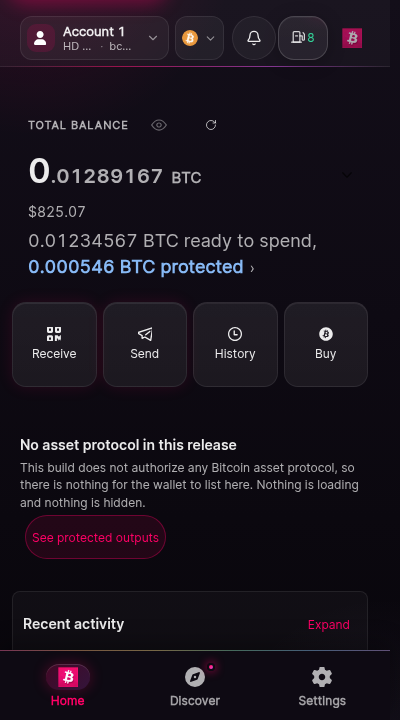
Read this before you trust anything else on this site
The build published on the Chrome Web Store is 1.0.13, from 15 April 2025. This documentation is written against the 1.7.5.8 source tree, which has not been submitted or published. If you installed from the store, you are running the older build, and screens described here may not exist in it.
In 1.7.5.8 as committed, 0 of 42 protocols authorize any operation. Nothing on this site should be read as a promise that a protocol action will work in your build. The screen in your own wallet is the answer.
What do you need to do?
- Install the walletFrom the real listing, verified
- ReceiveYour address, safely shared
- Send or check sendingIncluding when a build cannot send
- Review before you signRead approvals like contracts
- Protected outputsWhy part of the balance holds back
- Connect an applicationWhat a connection grants
- Developer integrationSimulated provider, generated contract
- Emergency helpWorks offline once saved
Who are you?
Guided journeys
Step-by-step walkthroughs with checkpoints, recovery paths, and progress that stays in this browser.
- Lifecycle
- Experimental
- Documented version
- 1.7.5.8
- Published version
- 1.0.13
- Chains
- Bitcoin, Dogecoin, Zcash, Fractal
- Custody
- Yours alone
What this documentation is for
Section titled “What this documentation is for”You are holding your own keys. That means no company can move your money, and equally that no company can give it back. Every page here is written so that believing it cannot cost you anything: where a capability could not be verified in the wallet’s source, this site says it is not available rather than describing how it might work.
Install and set up
Which browsers work, where the real extension lives, and how to create or import a wallet without losing it a week later.
What a signature authorizes
The single most valuable page here. Four kinds of approval, and the exact boundary of each one.
Protected outputs
Why some of your balance will not spend, and why that is the feature rather than the fault.
Review before you sign
How to read the approval screen top to bottom, and which line to check when you are in a hurry.
Backup and recovery
Which loss your recovery phrase covers, which it does not, and the one situation with no way back.
If something is wrong
What to do first when you think your phrase was seen, a signature went wrong, or coins moved without you.
Where things live
Section titled “Where things live”Supported features
What is present, what is behind a release gate, and what does not exist at all.
Screen Atlas
Every verified screenshot of the wallet, filterable and deep-linkable, with its release and provenance.
Safe simulator
The real wallet interface on fixture data: no keys, no network, nothing that can sign.
Transaction Safety Lab
Study real approval scenarios - fees, change, protected outputs - without signing anything.
Protocol registry
All 42 protocols, their chains, their intended operations, and their authorization state.
Known limitations
Every limit we can state plainly, including the ones that are inconvenient to admit.
Provider API
For application developers integrating a connect and sign flow with the extension.
Troubleshooting
The failures people actually hit, and what each one means about your funds.
Support and security reporting
Where to ask, where to report a vulnerability, and what nobody will ever ask you for.
Related
Section titled “Related”- Product source: bitcoinuniverseio/wallet
- Documentation source: bitcoinuniverseio/docs-wallet
- Release candidates: wallet releases
- Every Bitcoin Universe component: docs.bitcoinuniverse.io
- Report a documentation error: docs-wallet issues