Protocol data status and recovery
Section titled “Protocol data status and recovery”Universe Inscribe keeps protocol construction tools separate from live discovery data. A provider problem in one protocol does not disable unrelated pages, wallet access, or inscription workflows.
What each state means
Section titled “What each state means”- Healthy means the configured source is reachable, on the correct network, structurally valid, and within its freshness limit.
- Syncing means a replacement index is being built and has not yet been promoted for production reads.
- Stale means the last verified generation is available but is too old to be represented as current.
- Tip not verified means the source answered and reported the block it reached, but the chain tip could not be read. Reads and new actions that depend on current data stay paused until the comparison is available.
- Unavailable means the source cannot currently provide trustworthy data. This state is never presented as an authoritative empty result.
- Disabled by policy means the protocol is intentionally unavailable because its production safety requirements have not been satisfied.
Empty results are shown only after a healthy source confirms that no records match the request. Retry controls repeat read-only requests and never replay mint, transfer, deploy, signing, or broadcast actions.
Live data architecture
Section titled “Live data architecture”The production service uses independently monitored sources for OP-20, Drops and OP_DROP, ARC-20 and Atomicals, TAP on Dogecoin, BLOCK-20, ChainBloom, DUST-20, and other enabled explorers. Each source has its own liveness, readiness, freshness, network, schema, and checkpoint checks.
Bitcoin fee, transaction, address, and UTXO reads use the Universe-operated Mempool service on the shared Indexers server. Inscription, content, Rune, and BRC-20 reads use the private Ord service on that same server. Inscribe reaches both services through persistent private tunnels, so node and indexer ports are never exposed to the browser and public blockchain providers are not used as fallbacks.
The Ord service reports the block height it has reached. /api/health carries
that height, the chain tip, and the difference between them for each source, so
the difference between “not answering,” “answering without a readable chain
tip,” and “still reading older blocks” is visible rather than inferred.
Browser fee, transaction, address, and UTXO requests stay on the Inscribe origin. The API relays only reviewed read paths to the private Mempool service, so wallet and payment screens never connect to an indexer or public explorer directly.
Drops and OP_DROP additionally require two private, Universe-operated Bitcoin Core processes to agree on the finalized block hash. If either verifier is unavailable or disagrees, their readiness stays unavailable instead of falling back to a public blockchain provider.
Their authoritative index also runs on a private, loopback-only MySQL 8.4 service. Database migration is prepared beside the active service from a consistent snapshot, verified for the complete table set and custody rules, and promoted only with an exact release candidate. A database version label alone is never treated as protocol readiness.
The Inscribe application database follows the same no-interruption rule. The serving MariaDB database keeps accepting writes while a private MySQL 8.4 candidate is loaded and checked. Transactional change capture records the exact events present in the snapshot and uses committed replay receipts, so a retry cannot apply an acknowledged event twice. Traffic moves only after schema, row, health, drain, and smoke checks pass.
Atomicals NFT and Realm browsing uses one unified generation so NFT, Realm, Subrealm, lookup, and resolver views agree at the same chain checkpoint. Drops and OP_DROP use one authoritative source for artifact and token state. BLOCK-20 reads are derived from a self-hosted Bitcoin Ordinals projection rather than an unbounded legacy worker.
What you see while a source is catching up or down
Section titled “What you see while a source is catching up or down”The app does not reduce this to one word. When a source cannot answer:
- The banner names the source and says that everything which does not read it is working normally. It does not claim the wait is short.
- “See what is affected” opens the service status panel. Each source shows its state, the block it has reached against the chain tip, how many blocks behind that leaves it, and the workspaces that read it. Sources that are answering are listed too, so it is clear what is unaffected.
- A feature an operator switched off is listed separately from a source that is down, because those are different problems with different fixes.
- Actions that write to the chain stay paused, and the reason names the source and states that nothing already signed or broadcast is at risk. Reading, drafting, and your wallet keep working.
When a source is rebuilding its index, the panel shows how fast it is reading blocks, measured from the heights your browser has actually seen since you opened the page, and what that pace implies for the rest. Until there is enough measurement it says so rather than showing a completion time it cannot support.
What the portfolio shows while a source is down
Section titled “What the portfolio shows while a source is down”The portfolio reads several independent sources: the Bitcoin node for your balance, the Ordinals index for inscriptions and Runes, and separate indexes for Mezcal, SRC-20, OP_DROP and OP_RETURN names. One of them being down does not empty the page; the rest still answer and what they report is still shown.
When a source does not answer, the portfolio names it above your holdings and says that anything held there is missing from the page, that what is shown is everything the sources that did answer reported, and that nothing you own has changed. The header reads “Partial” rather than “Live” for as long as that is true.
An empty portfolio is never presented as an answer while a source is silent. The page says that nothing was found in the sources that answered and that this is not a complete picture of what the address holds. “No assets found for this address” appears only when every source answered.
This applies per source. If only the Ordinals index is behind, your Mezcal, SRC-20 and OP_DROP balances are still real numbers from indexes that answered.
Getting back to an order you left
Section titled “Getting back to an order you left”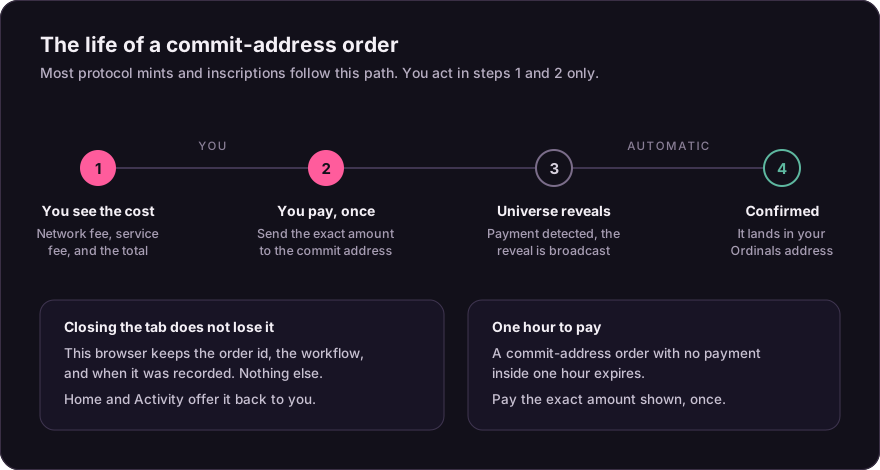
Access to an order is a secret Inscribe keeps in the browser’s memory and never writes to storage. That is what stops another site reading it, and it means a reload lets it go. Reopening an order asks your wallet to prove it owns the order before any payment detail is shown, or accepts an encrypted recovery kit if you saved one.
Home lists the orders this browser started under “Orders you started in this browser”, newest first, with the workflow, the order reference, and how long ago it was recorded. Opening one takes you to its status page, where the ownership check above runs. You can forget an entry at any time, and an order that finishes drops off on its own.
The list is a set of references. It holds the order id, the workflow, and the time this browser saw it. It never holds the order secret, an address, an amount, or anything about your wallet, and it is not sent anywhere. It is kept to the 50 most recent orders and to 30 days.
Because it cannot read an order without the secret, the list does not show a status. It tells you the order exists and how to reach it; the status page, after the ownership check, tells you where the order stands.
An order started before this list existed still appears, because its reference was already in the browser. Those entries carry no time and say so rather than showing an age that would be wrong.
When a release lands while your tab is open
Section titled “When a release lands while your tab is open”Every screen in Inscribe loads as its own file, and a release replaces those files. A tab that has been open across a release asks for a file that is no longer on the server, and the screen you clicked does not open.
Inscribe recognises that and says so, rather than reporting a crash: a new version was released, reload to fetch it. A dropped connection produces the same failure and the same fix, so the message covers both.
Nothing you started is lost by the reload. The orders this browser recorded are listed on Home when it comes back, and your wallet reconnects the way it did before. Reopening an order still asks your wallet to prove it owns the order, as it does after any reload, because the order secret is only ever held in memory.
Safety gates
Section titled “Safety gates”Some research protocols remain visible for documentation or controlled-network work while production actions stay disabled. Universe does not turn these features on merely to make a status page appear healthy. Mainnet writes require the protocol’s network profile, independent authorization, authoritative index, transaction safety checks, and a verified readiness canary.
CAT-20 transaction features remain fail-closed when the required Fractal data and signing dependencies are unavailable. Market discovery reports that dependency state directly instead of returning a misleading empty market.